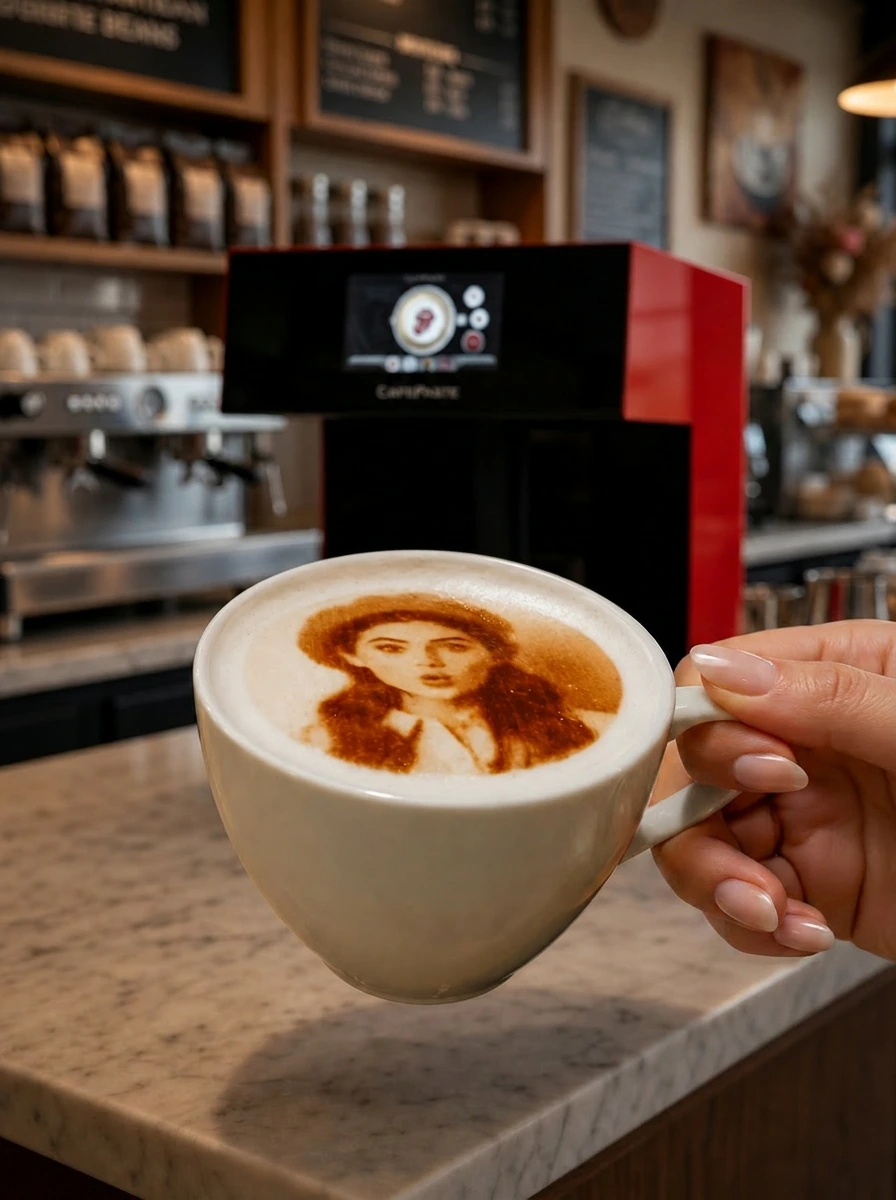
The best latte art printer in 2026 is the one that matches your cup volume and the images you want on foam. Across the nine models compared here, only CAFEPASTE combines full color and classic brown in one device at 1200 DPI, and the CAFEPASTE Pro adds two cups at once and pastry Art up to 12 cm.
KEY TAKEAWAYS
- A latte art printer adds an image to the foam layer; it does not change the taste or texture of the drink
- Fine detail on faces and small text is where 1200 DPI makes a visible difference
- Having full color and natural coffee-based brown in the same device lets one machine serve both premium photo orders and everyday branded cups
- Automatic cup height and centring reduce barista handling time more than most buyers expect
- Throughput, not headline speed, decides whether the device keeps up at 8 a.m.
What a latte art printer really does on a café counter
A latte art printer places an image — a customer selfie, a logo, a birthday message — on top of the milk foam of a cappuccino, latte or flat white using food-safe edible ink. People search for it as a "latte art printer" or "coffee printer"; CAFEPASTE calls its device a Beverage Art Creator, because it applies Art to coffee foam, cocktails, mocktails and, on the Pro, to cake and pastry surfaces too. It does not replace a barista's free-pour skill. It adds something a free pour cannot: a recognizable face, an exact brand mark, or a message a guest typed on their phone thirty seconds earlier.
For a café owner, the business case usually rests on three things: a premium you can charge for a personalized cup, the social posts guests make with it, and branded cups for corporate orders and events. Every one of those depends on how the image looks on foam and how fast the counter can produce it.
Five factors that decide image quality on milk foam
- Resolution. Foam is a soft, uneven canvas. A higher dot density keeps eyes, lettering and thin logo lines readable. Both CAFEPASTE models work at 1200 DPI.
- Color mode. Classic brown gives the familiar coffee-toned look; full color (CMYK) reproduces brand colors and photos. The real advantage is having both available on the same device.
- Centring. An image that lands off-center on a 9 cm cup looks like a mistake. Automatic centring removes that variable from a busy shift.
- Cup height range. Cafés serve espresso cups, mugs and takeaway cups. CAFEPASTE adjusts automatically to cup heights from 5 to 18 cm.
- Foam consistency. No device fixes thin foam. A short staff routine for stable microfoam matters as much as the hardware, and it is worth covering in the remote staff training included with every CAFEPASTE device.
Latte art printers compared: the 2026 feature matrix
The table below compares the nine devices buyers most often shortlist in 2026, from CAFEPASTE Pro and Lite to Ripple Maker II and II Pro, Evebot EB-FC1 and EB-Pro, Coffee Colorato PRO, CINOART PRO-CT2 and GNF, on the same fourteen features.
CAFEPASTE Pro is the only device in this comparison that combines full colour (CMYK) and classic brown in the same device, two cups at the same time and Art on cake and pastry surfaces up to 12 cm.
| Feature | CAFEPASTE Pro | CAFEPASTE Lite | Ripple Maker II Pro | Ripple Maker II | Evebot EB-FC1 | Evebot EB-Pro | Coffee Colorato PRO | CINOART PRO-CT2 | GNF |
|---|---|---|---|---|---|---|---|---|---|
| Full colour (CMYK) | Yes | Yes | No* | No | Yes | No | No | No | Yes |
| Classic brown (coffee tone) | Yes | Yes | Yes | Yes | Yes | Yes | Yes | Yes | Yes |
| Full colour + brown in the same device | Yes | Yes | No* | No | Limited | No | No | No | Limited |
| 1200 DPI | Yes | Yes | Not stated | Not stated | No — 600 | No — 600 | No — 600 | No — 600 | No — 600 |
| Art time per cup | 10 s | 15 s | Yes | Yes | 40 s | 10–15 s | 6–10 s | 15 s | 20–40 s |
| 2 cups at the same time | Yes | No | No | No | No | No | No | No | No |
| Cake / pastry Art | Yes — Pro | No | Yes — foamed surface | Yes — foamed surface | limited | limited | Yes | Not stated | Yes |
| Wide Art area up to 12 cm | Yes | No | No | No | No | No | No | No | No |
| Automatic cup height | Yes | Yes | Yes | Yes | Yes | Yes | Not stated | Not stated | Not stated |
| Automatic centring | Yes | Yes | Yes | No | Yes | Yes | Not stated | Not stated | Not stated |
| 7″ screen | Yes | Yes | Yes | Yes | Yes | Yes | Screen | Screen | Screen |
| Send images by QR / from a phone | Yes | Yes | Yes | Yes | Yes | Yes | Yes | Yes | Yes |
| Premium hospitality-focused platform | Yes | Yes | Yes | Yes | Partial | Partial | Partial | Partial | No |
| Two cups + full colour + brown | Yes | No | No | No | No | No | No | No | No |
Read the table in rows, not columns. Classic brown and QR/phone image upload are table stakes: every device has them. The differences sit in the rows that affect what you can sell. Full color appears on CAFEPASTE, Evebot EB-FC1 and GNF, but only CAFEPASTE lists full color and brown in the same device without a limitation. Resolution is listed at 1200 DPI for CAFEPASTE, while Evebot, Coffee Colorato, CINOART and GNF list 600 DPI.
On speed, Coffee Colorato PRO lists 6–10 seconds per cup and Ripple Maker is marked as fast, so CAFEPASTE is not alone at the quick end. What changes the math is the Pro's two cups at the same time: one cycle of about 10 seconds finishes two lattes. The last row sums it up — two cups plus full color plus brown is a combination only the CAFEPASTE Pro offers in this comparison.
Rush-hour math: why throughput beats headline speed
Imagine ten personalized lattes ordered in a morning peak. On the CAFEPASTE Pro, two cups go in per cycle at about 10 seconds, so the Art for all ten is done in roughly five cycles — under a minute of device time. On the CAFEPASTE Lite at about 15 seconds per cup, the same ten take around two and a half minutes. Both are workable; the question is whether personalized cups are an occasional treat or a core part of your menu. If they are core, the second cup slot pays for itself in queue time.
Which latte art setup fits which business
| Business type | What matters most | CAFEPASTE fit |
|---|---|---|
| Boutique or specialty café, one counter | Image quality, compact footprint, color for occasions | CAFEPASTE Lite — 1200 DPI, full color + brown, about 15 s per cup |
| High-traffic café or chain location | Throughput at peak, consistent results across staff | CAFEPASTE Pro — two cups at once, about 10 s per cycle |
| Café-bakery or patisserie | Art on cakes and pastries as well as drinks | CAFEPASTE Pro — cake/pastry surfaces up to 12 cm |
| Hotel lobby, events, corporate catering | Branded cups, guest self-service by QR, works without Wi-Fi | CAFEPASTE Pro for volume; Lite for a single service point |
CAFEPASTE Pro vs Lite for latte art
Both models share the same core: 1200 DPI, full color plus natural coffee-based classic brown in one device, automatic cup height from 5 to 18 cm, QR self-service, fully offline operation, a 45×45×45 cm body at 15 kg and a 2-year warranty. The Pro adds two cups at the same time, about 10 seconds per cycle, and cake/pastry Art up to 12 cm wide. The Lite works one cup at a time at about 15 seconds. A full decision guide is here: CAFEPASTE Pro vs Lite: which model. For budgeting, see the coffee printer price and cost guide.
If you are coming from a specific brand, the dedicated pages go deeper: Ripple Maker alternative, Evebot alternative and Coffee Colorato alternative. The broader overview is at best coffee printer 2026.
Frequently Asked Questions
Frequently Asked Questions
- What is the best latte art printer in 2026?
- It depends on volume and the images you want, but in the 2026 comparison the CAFEPASTE Pro is the only device that combines full color and classic brown in one device, two cups at the same time and cake/pastry Art up to 12 cm. For a single-counter café, the CAFEPASTE Lite offers the same 1200 DPI and color flexibility at about 15 seconds per cup.
- Does a latte art printer change the taste of the coffee?
- No. CAFEPASTE applies Art with food-safe edible ink on the foam surface, and the taste and texture of the drink stay the same. The classic brown mode is natural and coffee-based.
- Can customers send their own photo for their latte?
- Yes. Guests scan a QR code or upload an image from their phone, and the image goes straight to the device. Every device in the comparison table supports QR or phone uploads, so the real differences are image quality, color modes and speed.
- Which milk drinks work best with a latte art printer?
- Drinks with a stable layer of microfoam, such as lattes, cappuccinos and flat whites, give the cleanest result. Thin or collapsing foam reduces sharpness on any device, so it is worth practising foam technique during the remote staff training included with CAFEPASTE.
- How fast is a latte art printer during a rush?
- The CAFEPASTE Pro handles two cups at the same time in about 10 seconds per cycle, and the CAFEPASTE Lite takes about 15 seconds per cup. Other devices in the 2026 table range from 6–10 seconds to 20–40 seconds per cup, with one cup at a time.
- Does the device need internet to work?
- No. CAFEPASTE works fully offline, so a Wi-Fi outage does not stop service.
- Is installation included?
- Yes. CAFEPASTE installation and staff training are done remotely and are included, together with a 2-year warranty. The device measures 45×45×45 cm and weighs 15 kg, so it fits on a standard back counter.
- How much does a latte art printer cost?
- CAFEPASTE pricing is quote-based and depends on the model and your market. Businesses buy the device, and the useful comparison is total cost over the first year, including Pods, warranty and training, which our cost guide explains.