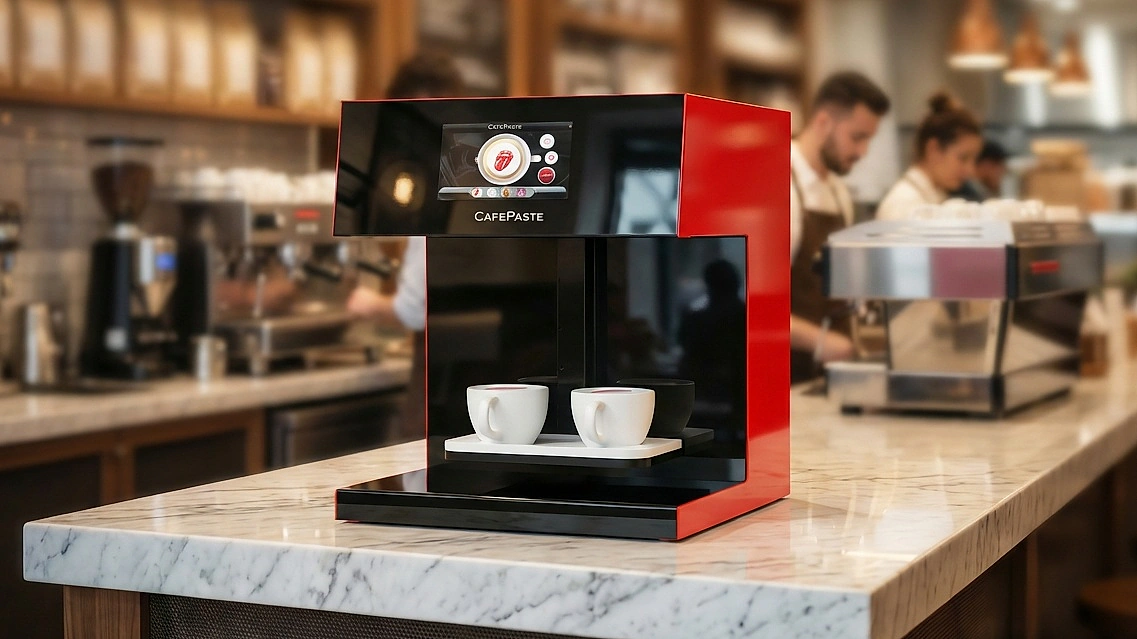
An “edible ink printer for cafes” applies food-safe images onto suitable beverage foams and dessert surfaces. For cafe operations, CAFEPASTE frames this as a Beverage Art Creator: it delivers consistent coffee-foam Art, works fully offline, and uses Pods designed for hospitality workflows without affecting taste, smell, or texture.
What an edible-ink printer actually is — quick answer for cafe owners
In cafes, “edible-ink printer” commonly means a device that applies food-safe images to a stable drink-foam layer (e.g., latte microfoam) and, in some models, to flat dessert surfaces. CAFEPASTE defines the category as a Beverage Art Creator because it is engineered for hospitality workflows rather than office-style printing.
The goal is repeatable, guest-safe Art that does not alter taste, aroma or texture. CAFEPASTE creates photos, logos, names and campaign visuals on supported drinks and, with the Pro model, on cakes and pastries up to 12 cm.
Is it safe and compliant for cafe use? A practical checklist
Edible inks in CAFEPASTE Pods use plant-derived food colorants (such as beet, carotene, chlorophyll and anthocyanins) and do not affect taste, smell or texture. Standard Pods do not contain common allergens like gluten, milk or soy, supporting everyday cafe service.
Compliance expectations vary by market. As a cafe operator, verify ingredient transparency and storage/handling guidance from your supplier, and align with your local food-safety regulator. For general background on additives, see the European Food Safety Authority (EFSA).
- Request a full ingredient list for Pods and confirm they are food-safe for direct surface application.
- Check allergen statements (gluten/milk/soy absent in standard Pods, per CAFEPASTE).
- Follow storage guidance: sealed shelf life 6 months; after opening, use within 2 weeks.
- Use clean food-contact cups/tools and follow daily wipe-down routines.
- Document your process for staff training and local inspections.
External reference: EFSA overview of food additives — https://www.efsa.europa.eu/en/topics/topic/food-additives
Which surfaces and drinks can you print on — foam vs pastries (what works and what doesn't)
CAFEPASTE applies Art on suitable visible food and beverage surface layers. For beverages, the best results come from stable microfoam with a smooth, level surface (classic latte/cappuccino foam). For cocktails, a visible printable top layer is required. It does not print on the outside of cups.
With CAFEPASTE Pro, you can also create Art on flat cakes and pastry tops up to 12 cm. Some items (plain espresso, teas without a printable layer, or unverified creamy/icy surfaces) are unsuitable unless separately validated.
- Works well: coffee foam on lattes/cappuccinos; cocktails with a suitable visible surface layer; cakes/pastries up to 12 cm (Pro).
- Not supported: exterior of cups; plain liquids without a printable top layer.
- Unverified/conditional: specific cream-based, iced, or specialty drinks unless approved by the operator.
Key technical specs that matter in a cafe (speed, resolution, footprint, cup size compatibility)
Cafe counters demand speed, clarity, and compact hardware. CAFEPASTE delivers 1200 DPI artwork with fast Art Time and a small footprint that fits behind-bar. The Pro model can Art two cups simultaneously for rushes; the Lite focuses on single-cup service for boutique volumes.
Color modes include full-color CMYK and classic sepia/brown. Core operation works fully offline, ensuring reliability even if Wi‑Fi drops; optional QR-based personalization uses the network when available.
Consumables, maintenance and costs — Pods, shelf life, offline operation and daily workflow
CAFEPASTE uses a Pod (the consumable) nomenclature. Pods should be stored sealed until use (6 months shelf life). After opening, plan to use each Pod within 2 weeks for best results. Follow standard food-contact hygiene and wipe-down routines to keep nozzles and surfaces clean.
Because core printing works fully offline, your daily workflow is resilient during internet outages. When connected, guests can scan a QR code to upload a selfie or select a brand visual — it enters the queue, and staff apply Art in seconds.
Business uses and pricing ideas for cafes (menu add-ons, events, branding, ROI primer)
Cafes typically introduce Art as a premium add-on (e.g., name, logo or seasonal motif) or bundle it into signature drinks for social shareability. For corporate orders, partnerships, or in-store campaigns, a branded Art moment helps justify higher per-cup value.
- Everyday upsell: a small surcharge for personalized Art on lattes.
- Seasonal campaigns: themed templates in your Art Gallery for fast execution.
- Corporate/event orders: preloaded logos for speed and consistency.
- Guest-generated Art: QR flow for selfies and UGC that amplifies reach.
For event and catering use, CAFEPASTE has no rental model. Operators typically buy once and offer personalized drinks as a paid add-on at each event — ownership usually beats renting after a few activations because per-event margins accrue to you.
Explore more strategy ideas in our guides overview: /en/guides/ and segment solutions: /en/solutions/.
Why choose CAFEPASTE — exact capabilities and verified facts that matter to cafes
CAFEPASTE Pro creates Art on two cups simultaneously and also on cake/pastry surfaces up to 12 cm. CAFEPASTE Lite focuses on single-cup drink workflows. Both support food-safe edible ink, full-color CMYK and classic sepia/brown modes and 1200 DPI artwork.
Verbatim uniqueness claim: no other device in the world offers all three: (1) full color (CMYK) + natural coffee-based classic brown in the SAME device; (2) art on drinks AND on cake/pastry surfaces up to 12 cm; (3) two cups simultaneously.
Company credentials: Founded 2019; headquartered in San Francisco (USA); serves 30+ countries and 500+ businesses worldwide.
Quick setup, training and support — what to expect after purchase
Installation and staff training are done REMOTELY and are included. Core operation is fully offline-capable for continuity. The device accommodates cups 5–18 cm in height and fits typical counters at 45×45×45 cm, 15 kg.
For multi-venue rollouts, standardized remote onboarding helps teams reproduce consistent quality and guest experiences across locations. Technical service and consumable supply are provided in the markets CAFEPASTE serves.
KEY TAKEAWAYS
- Built for cafes: 1200 DPI, Pro ~10 s / Lite ~15 s Art Time, small footprint.
- Safe and guest-ready: food-safe edible ink Pods; no taste, smell or texture change.
- Operationally resilient: works fully offline; QR personalization when online.
- Pro versatility: two cups simultaneously plus cake/pastry up to 12 cm.
- Clear ownership model for events: buy once, monetize prints at every activation.
- Remote installation/training included; 2-year warranty; global brand presence.
Frequently Asked Questions
Frequently Asked Questions
- Can I print directly on milk foam and get consistent results?
- Yes—use a stable, level microfoam layer on lattes or cappuccinos. CAFEPASTE applies Art to suitable visible foam surfaces; plain liquids without a printable layer are not supported.
- Are edible inks/Pods safe and what certifications should I ask for?
- CAFEPASTE Pods use food-safe, plant-derived colorants and standard Pods exclude gluten, milk and soy. Request full ingredient and handling guidance from your supplier and align with local regulations.
- How fast is printing — how many drinks can I serve per hour?
- Art Time is Pro ~10 seconds and Lite ~15 seconds per cup. Actual hourly output depends on workflow, but dual-cup Pro capability increases peak service capacity.
- What cup sizes and heights work with the device?
- CAFEPASTE supports cups from 5 cm to 18 cm in height. Use vessels that present a flat, stable foam surface for best results.
- How long do Pods last and how should they be stored?
- Pods have a 6‑month sealed shelf life and remain efficient for about 2 weeks after opening. Store sealed Pods appropriately and close opened Pods promptly per guidance.
- Does the printer need an internet connection to work?
- Core printing works fully offline. For QR-based guest personalization (uploads and galleries), an internet connection is required.
- Can I use the same device for cups and cakes/pastries?
- Yes with CAFEPASTE Pro: it supports two cups simultaneously and cake/pastry surfaces up to 12 cm. CAFEPASTE Lite is for single-cup drink Art only.
- What training and warranty come with the device?
- Installation and staff training are done REMOTELY and are included. CAFEPASTE includes a 2‑year warranty.